Glossary
Classifiers
All classifiers in Batscope 4.2 have been trained and optimized on the same training set consisting of 61’700 recorded calls of 30 Swiss bat species. This is an improvement over the training set used in Batscope 4.1.1
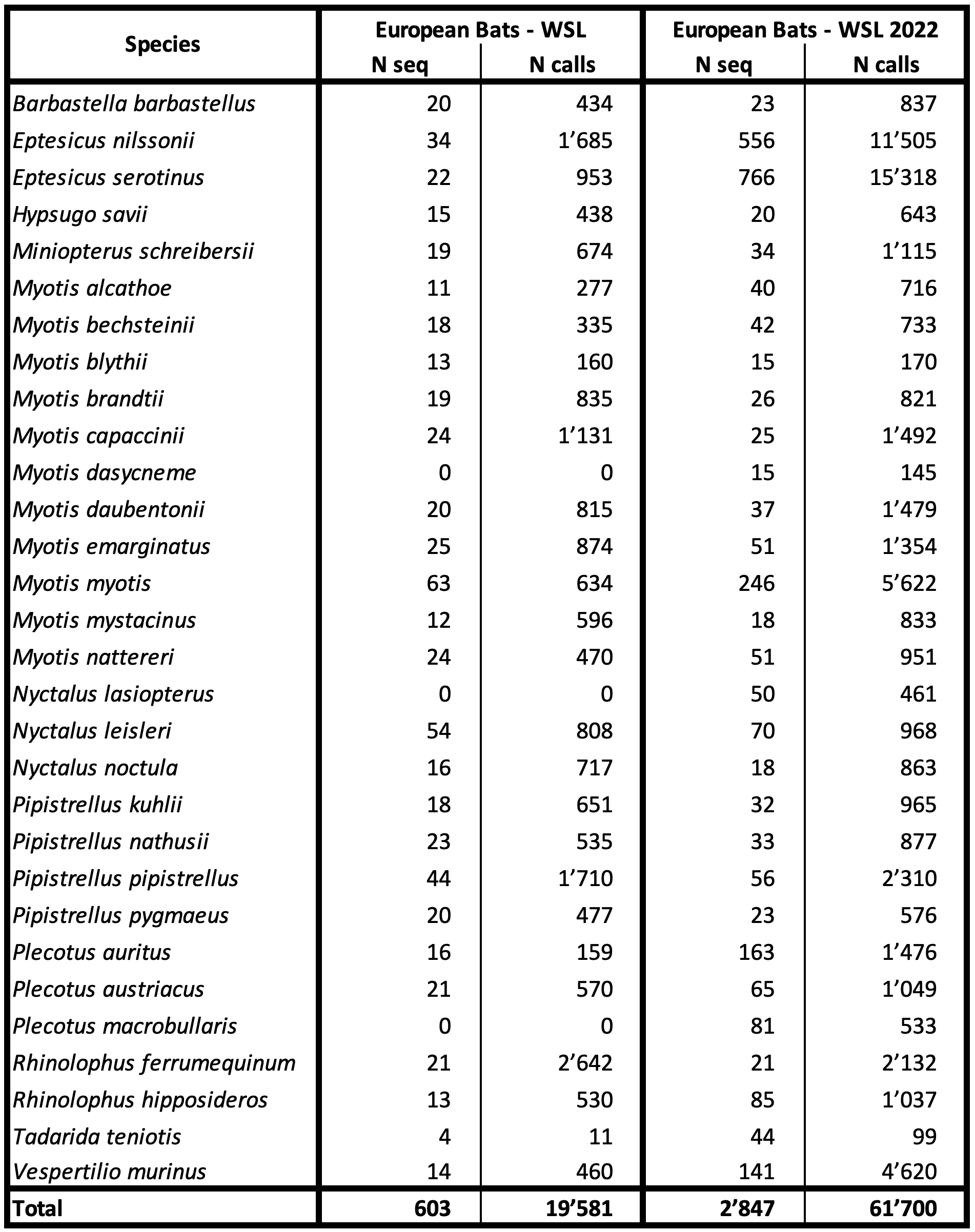
Figure 8 Number of total sequences and calls per species in the training set. European Bats - WSL 2022 is the new dataset version in Batscope 4.2
All classifiers are based on an underlying feature set of 40 features per bat call. The set of features is the same for call classifiers. The features includes the frequencies and slopes of the call trajectory, the call duration, the peak frequency, percentiles of the energy distribution and other differentiating features.
The most reliable classifier is the SVM, with an accuracy of 89.2%. The seven classifiers performed differently on this training set and also differ in their ability to correctly recognize new bat calls. For an explanation of accuracy”, *precision” and *sensitivity see the table given in Wikipedia.
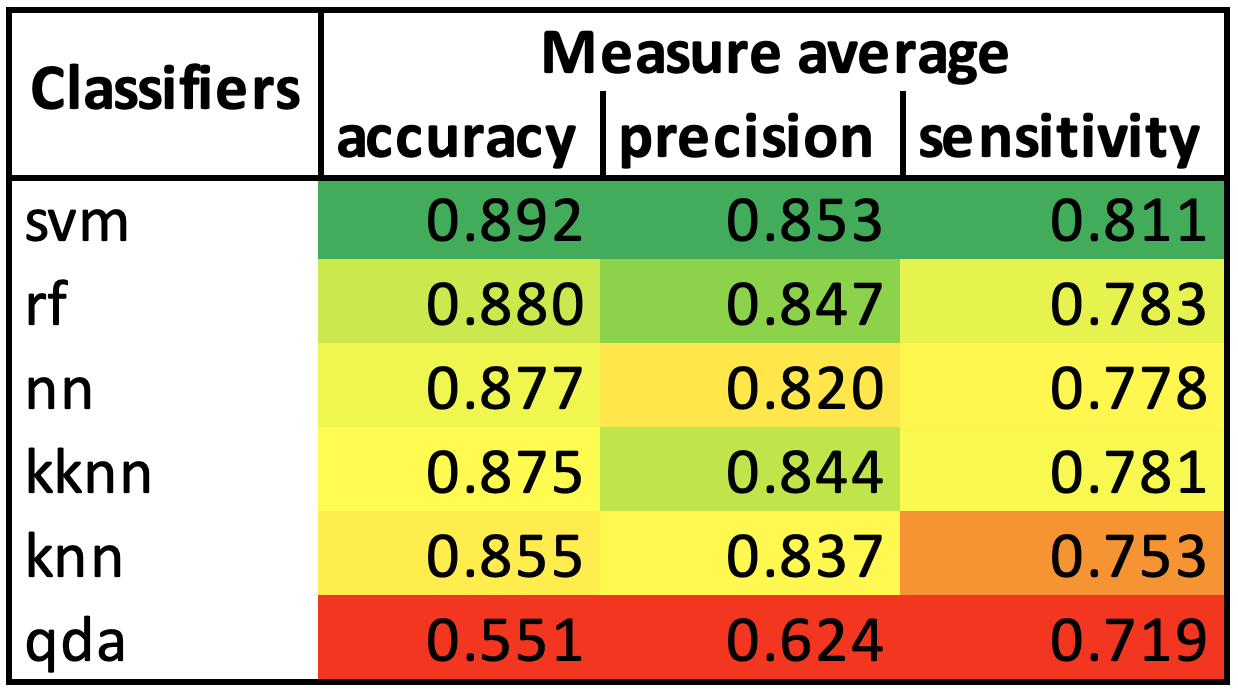
Figure 9 Statistics of 10-fold crossvalidated classifications on the training set
Combining the results from different Classifiers can improve the classification quality.
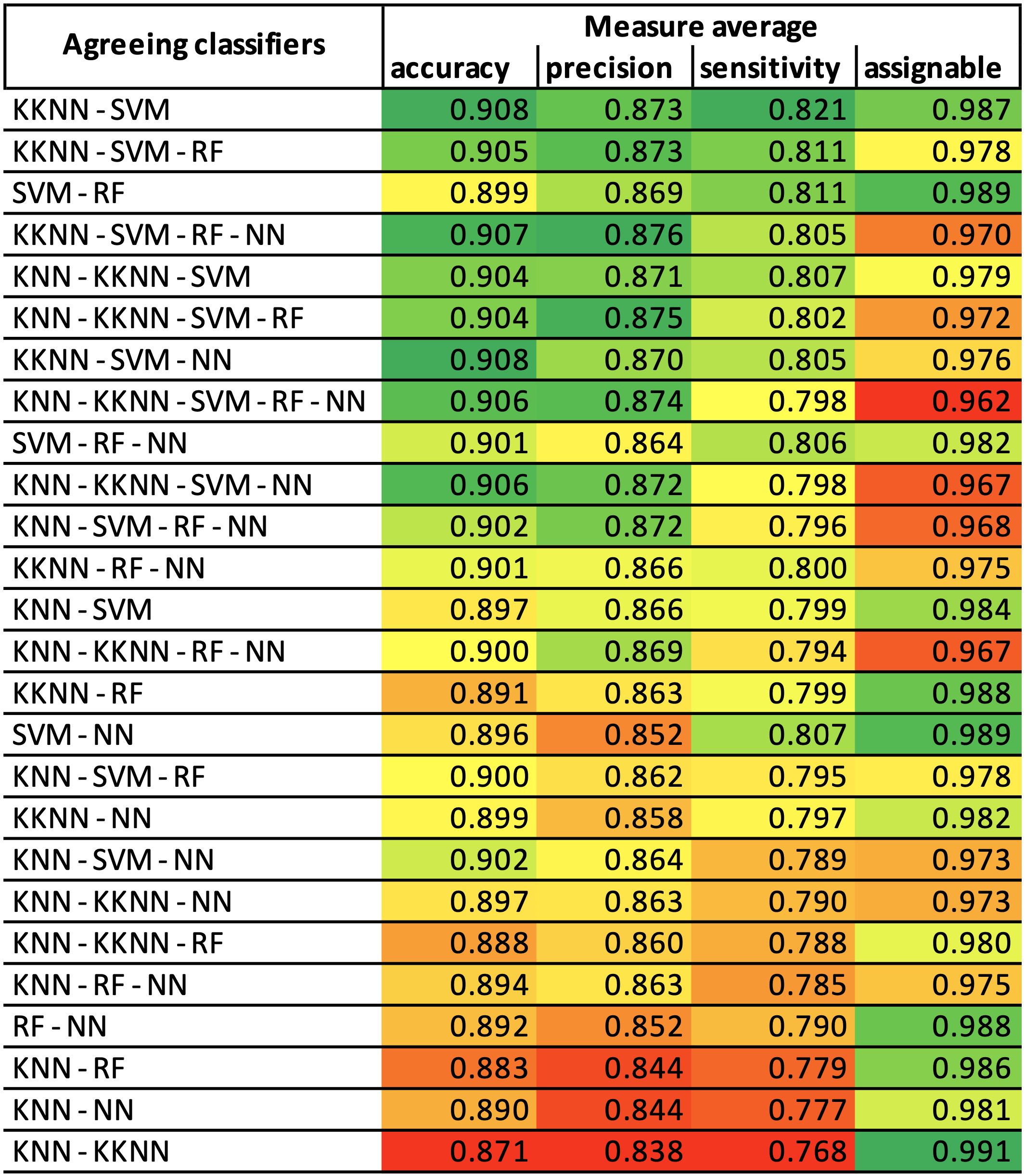
Figure 10 Statistics of classification when combining the outputs of multiple classifiers. Only calls where the listed classifiers agree are considered, assignable being the percentage of sequences that can be classified under this constraint. The top ranking KKNN - SVM combination is chosen as a default for Batscope, as it offers a good trade off between accuracy and number of sequences that remain assignable. Combinations with QDA are excluded, as they consistently perform worse as their counterparts without QDA.
Note
For cross-validation, sequences were split randomly into test and training sets. This controls for direct overfitting of the model to the distribution of the training set. The training set was carefully constructed to represent the domain of bat calls as well as possible. However, it has to be assumed that that the training may be biased towards specific recording equipment, setup, method, location, pre-processing and other hard to control variables. It is therefore not guaranteed that the classification performance stated above will be attained on a completely independently recorded dataset.
Confidence Interval Test
After each classification, i.e. each time a classifier or ensemble of classifiers has proposed a most likely species for a call, the three most distinctive features of the call are tested against stored reference values of the proposed species.
These features are: Call duration, peak frequency and bandwidth.
If any of these values lies outside a 95% Confidence Interval of the training set’s average of the proposed species, the field Confidence Interval Test is marked with Fail, indicating a questionable classification result.
You could consider disabling the Status of such a call to improve overall Classification accuracy.
Range Base
For each of the species in the training base, we have defined its range of occurrence with the help of species’s distribution data derived from either CSCF (for CH Alphahull) or from GBIF (for Europe MCP and Europe Alphahull).
For acknowledgements see BatScope’s About dialog.
Proposed classifications for sequences with known recording location will be tested against the range base set for the project to determine if the classification is realistic. The result is displayed in the classification table as either Pass or Fail together with how far outside the species range the recording was made.
Preferences
Confidence Display Threshold - only classifications above this threshold (0.01 = 1%) are shown in the user interface.
Verifier Name - the name saved with verifications you add. Different users can store their names in their own user account.
Channel - the recording channel during import of wav-files with multiple channels.
Map - the map collection ‘leaflet’ provides OpenStreetMap as well as SwissTopo areal image and maps.
Editor Application Path - the filesystem path of your audio editor installation (e.g. Audacity or Raven).
- Sequence Audio Playback Mode - set the preferred mode of playing back your audio sequences here:
UNPROCESSED - play back at the original sampling rate of the recording
SLOWED - the sampling rate is slowed down by a user settable factor - this corresponds to Time Expansion Mode
FREQUENCY DIVISION - frequencies are divided by a user selectable factor - the temporal pattern of a Sequence will be retained
HETERODYNE - the playback functions like a mixing detector - the Mixer Frequency can be set
Species Set
A species set is a collection of all data and processors associated with a group of species, such as Swiss bats or Latin American bats. Each species set contains its own Taxonomy, Plugins, Custom Processes, Filters and Statistical Models to assign species to the respective Taxonomy.
For legacy reasons, we have included the Species Set form BatScope 4.1.1 as European Bats - WSL. The new Species Set in BatScope 4.2 is termed European Bats - WSL 2022.
After having switched BatScope to another species set from the Species Set menu, all Projects and Collections not assigned to the current species set will be grayed out in the Projects View. You now can switch a project to the new species set, if it has the same frequency range as the original data.
Warning
When switching a project to a new species set, the processing state of its sequences will be reset. All calls will be removed!
Call Parameters
COLUMN |
UNIT |
DESCRIPTION |
most_likely_species |
Most likely species for the call |
|
ci_test |
Result of confidence interval test |
|
confidence_most_likely_species |
% |
Confidence for the most likely species for the call |
agreeing_classifiers_count |
Number of classifiers agreeing on the most likely species |
|
classifiers_used_count |
Number of classifiers used for classification |
|
snr |
dB |
Signal to Noise Ratio of call |
timep25p05 |
ms |
Duration between X% and Y% total call energy in filtered signal |
timep50p25 |
||
timep75p50 |
||
timep95p75 |
||
trajectorybandwidth |
kHz |
Bandwidth of trajectory |
timep05raw |
ms |
Time at which X% of total call energy is reached in raw signal |
timep25raw |
||
timep50raw |
||
timep75raw |
||
timep95raw |
||
timepeakraw |
Time of peak energy in raw signal |
|
durationiqrraw |
Duration containing 50% of call energy in raw signal |
|
durationd90raw |
Duration containing 90% of call energy in raw signal |
|
freqp05raw |
kHz |
Frequency at which X% of total call energy is reached in raw signal |
freqp25raw |
||
freqp50raw |
||
freqp75raw |
||
freqp95raw |
||
freqpeakraw |
Frequency of peak energy in raw signal |
|
bandwidthiqrraw |
Bandwidth containing 50% of call energy in raw signal |
|
bandwidthd90raw |
Bandwidth containing 90% of call energy in raw signal |
|
timep05fil |
ms |
Time at which X% of total call energy is reached in filtered signal |
timep25fil |
||
timep50fil |
||
timep75fil |
||
timep95fil |
||
timepeakfil |
Time of peak energy in filtered signal |
|
durationiqrfil |
Duration containing 50% of call energy in filtered signal |
|
durationd90fil |
Duration containing 90% of call energy in filtered signal |
|
freqp05fil |
kHz |
Frequency at which X% of total call energy is reached in filtered signal |
freqp25fil |
||
freqp50fil |
||
freqp75fil |
||
freqp95fil |
||
freqpeakfil |
Frequency of peak energy in filtered signal |
|
bandwidthiqrfil |
Bandwidth containing 50% of call energy in filtered signal |
|
bandwidthd90fil |
Bandwidth containing 90% of call energy in filtered signal |
|
trajectoryduration |
ms |
Duration of trajectory |
trajectorystartfreq |
kHz |
Characteristic frequencies of trajectory |
trajectorycenterfreq |
||
trajectoryendfreq |
||
trajectorymaxfreq |
||
trajectoryminfreq |
||
trajectoryavgfreqbin1 |
Averaged frequency of trajectory in each time bin |
|
trajectoryavgfreqbin2 |
||
trajectoryavgfreqbin3 |
||
trajectoryavgfreqbin4 |
||
trajectoryavgfreqbin5 |
||
trajectoryavgslopebin1 |
kHz/ms |
Averaged slope of trajectory in each time bin |
trajectoryavgslopebin2 |
||
trajectoryavgslopebin3 |
||
trajectoryavgslopebin4 |
||
trajectoryavgslopebin5 |
||
trajectoryavgcurvbin1 |
Averaged curvature of trajectory in each time bin |
|
trajectoryavgcurvbin2 |
||
trajectoryavgcurvbin3 |
||
trajectoryavgcurvbin4 |
||
trajectoryavgcurvbin5 |
||
trajectorystarttime |
ms |
Start time of trajectory |
intervalpre |
Interval to previous call |
|
intervalpost |
Interval to next call |
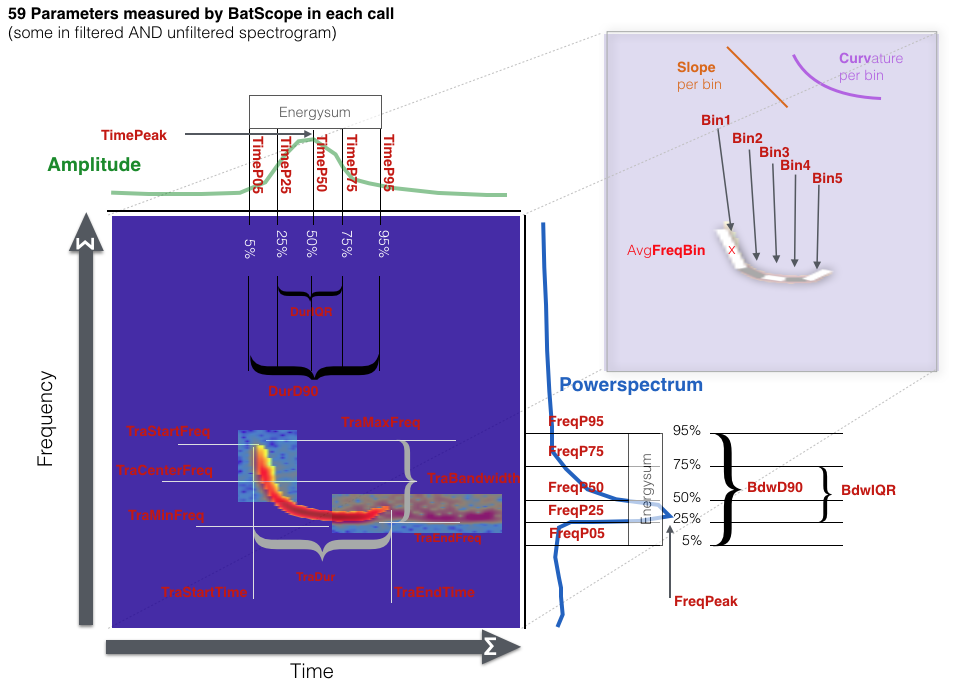
Figure 11 Graphical representation of the call parameters